
A member advocate’s task is to process and pair clients with our interview specialists as soon as we receive the request. This is important so make sure to process their request within 1-2 business days.
Understand that a well-prepared member has only the ff sessions:
- 1-Hour Pre-Mock Interview
- 2-Hour Pre-Mock Interview
A fully-prepared member has the ff sessions:
- 1-Hour Pre-Mock Interview
- 2-Hour Pre-Mock Interview
- Additional 2-Hour Pre-Mock Interview
- 1-Hour Q and A Session with Kevin
Currently our interview specialists are:
- Mark
- Kara
- Elena
By default, you need to assign pre-mock interview requests to Mark and 2-hour mock sessions to Kara and Elena.
For fully-prepared clients, if they sign up for an additional 2-hour mock interview. Please feel free to assign them to Kara again. We want the assignment process to be alternate.
PROCESS
- You will first receive an email on our IDC Interview Prep email about our client’s request or you’ll also be notified via Trello.
- Move the Trello card to the interviewer they will be paired with.
- After moving the card, send the client an email on who they are paired with and information on how they can schedule it. There are already templates for this on our Interview Prep inbox. Email templates name: 1 Hour Pre-Mock Interview and 2-Hour Mock -Interview Henry Subject should be either 1 Hour Pre Mock Interview, 2 Hour Mock Interview, Additional 2 Hour Mock Interview and or 1 Hour Q and A Session (depending on the request that was sent)
- Once you have sent the email, make sure to add the “Emailed Info or Scheduled” label on the Trello card of the client.
- Lastly, make sure to assign the requested email to the right interviewer.
“What to Do When” Scenarios:
- I can see the Trello card of the client request but it is not indicated what type of session it is
– Please see screencast above to learn what to do when this happens. - I got the Trello card notification but not the interview email on our IDC interview team inbox– Please see screencast above to learn what to do when this happens.
- Client have already used up their sessions– Please redirect them to the Mock Interview Signup page on our member site. If they have already used up their sessions, this page will give them the option to sign up for additional mock.
- The client did not receive a link to their mock recording– Go to our IDC Client Sessions youtube channel. Go to Youtube Studio Beta or Creator Studio and search for the client’s name on our list of videos. After finding the video, share the video with them by changing the video’s privacy settings. Just click on Share and input the client’s Gmail account. Also, make sure to check the box “Notify via email“.
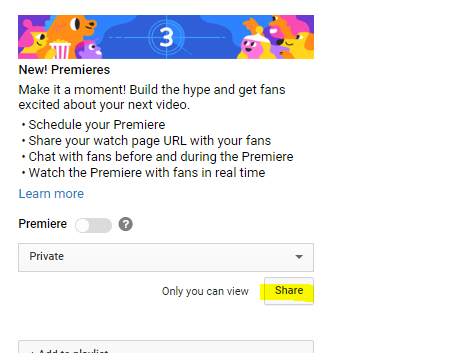
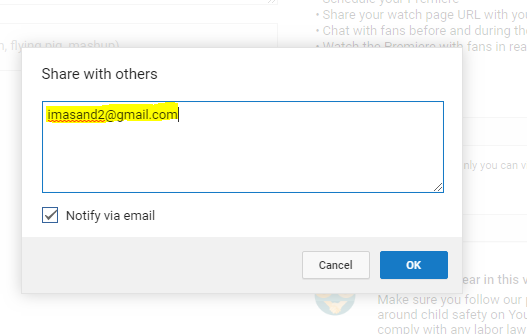
If the client is not using a Gmail account, just change the privacy settings of the video to unlisted and directly send the client a link to their mock recording video.
- How to verify if the client has already used up their mock sessions
– Use the IDC Client Sessions channel, Trello card and Form entries on our member site - The client cannot schedule mock interviews – gets the error “Already used up their mock sessions” even when they have not