
Workshops may be held every Wednesday of the week at 4PM PST/ 6 PM CST / 7 PM EST. There may be weeks where there are no Workshop Wednesdays, for those weeks we set Workshop Wednesday Replays.
Here’s the complete list of steps on how to set up Workshop Wednesday:
Week Before the workshop, After Previous Workshop is Over
- Create a promo image for the workshop.
Look for any relevant and appealing image on free stock photos site such as Unsplash and Pexels. Download them and use them to create a promo image. Please follow the format of the workshop promo image which you can find in this google drive folder. After creating the promo image, make sure to upload both JPG and PSD on the same drive folder. - Schedule a new meeting on StreamYard.
Before updating the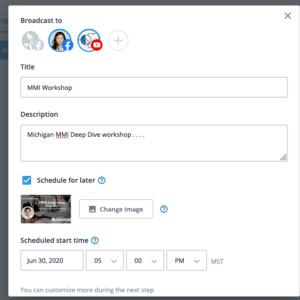 notification form, you’ll need to login to StreamYard, by entering the email address [email protected] at their login page and using the code that comes via email to complete the login process. After logging in, Create a New Broadcast and select both the IDC Facebook page and IDC Youtube channels for the destinations. Make sure you select Schedule for Later and set the date/time of the workshop. NOTE: Please notice what time zone StreamYard is set to (MST in image above) and adjust so that the event takes place at correct time in PST)
- Embed Youtube Video on Workshop Page
After scheduling the workshop in StreamYard, click the 3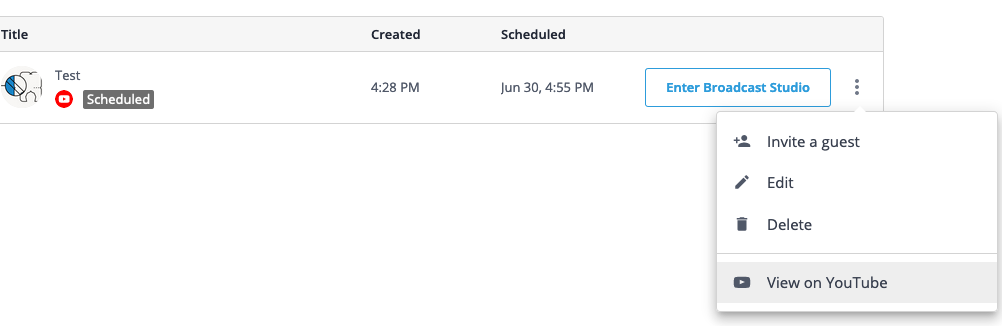 verticle dots on the upcoming broadcast page and then click “View on Youtube” which will take you to the schedule live video on Youtube. Then click the Share button and copy the URL
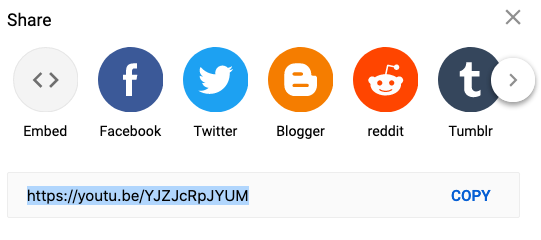 . Next, edit the IDC Workshop Page, open the Youtube box and replace the video URL with the new one.
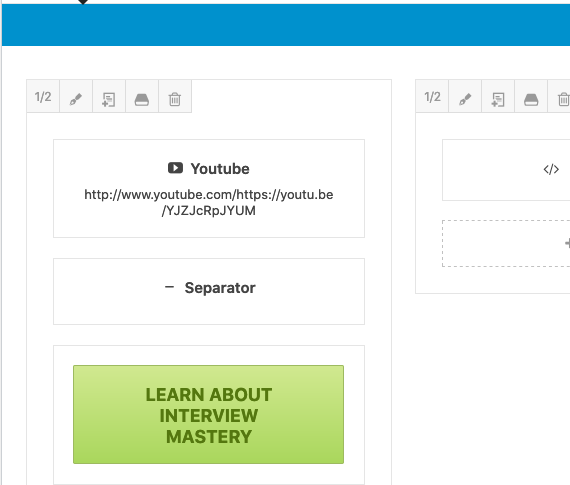
- Update Learn About button with appropriate course/service (image above). If workshop is interview related, Interview Mastery, if bench test related, Bench Test Mastery. If editing related, Signup for a Free Application Review. For each, update the URL to the correct info page destination.
- Update the notification forms.
Please update the notification forms here. You’ll want to update the Registrant Confirmation and Reminder Email for Registrants emails notifications with the correct meeting information. Please make sure to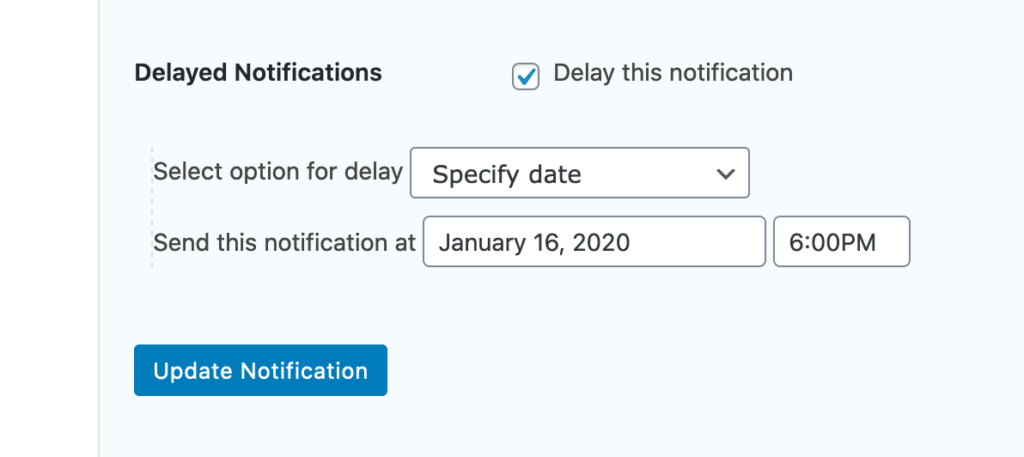 update the Topic title, date of the live workshop and the Workshop URL. Also, please update the Delayed Notification time at the bottom of the Reminder Email for Registrants to out exactly 2 hours before the actual event time on the day of the event. Since the site is in U.S. Pacific time, use that timezone for setting the correct time/date.
- Change the Schedule Form Settings
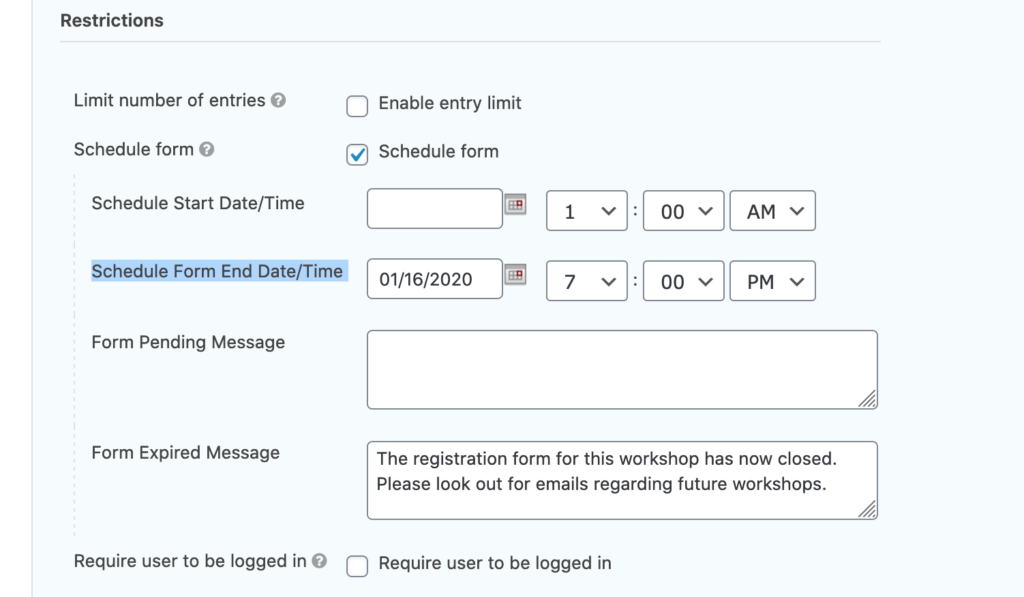
In the form settings, change the Schedule Form End Date/Time to the correct date and time. The date and time should be the event date and time, meaning the form should stop allowing registrations at the time of the event. - Prepare the workshop announcement newsletter.
Newsletter should be drafted the week before the workshop and should be sent out on Monday, preferably morning. Use the workshop announcement template on Active Campaign. You can also duplicate previous workshop announcement newsletters and edit it. For format and structure, please refer to this team article. - Newsletter review
After drafting the newsletter, send Alyssa or Kevin (depending on who’s the host of the workshop) a test email and have it reviewed by them. The due date for this task should be on Friday, before the workshop.
FIRST THING on MONDAY
- Share workshop on Facebook
Make sure to use UTM codes when sharing, and share the workshop RSVP page, not the page where they actually watch the workshop.Share it on- our FB page, tons of FB groups, and as a status update. - Update current affairs of newsletter, if applicableIf anything new came up, update the first section of the newsletter and afterwards send a test to Alyssa.
- Review newsletter, if applicable
Assign to Alyssa/Kevin after sending out a test email and slack them about this so they can get to it ASAP. Must be completed latest by Monday 8am Pacific. - Create newsletter reminder that should be sent out Wednesday 7 AM PST
FIRST THING WEDNESDAY:
- Facebook update
Important to do this at least 1 hour before workshop start time.Go back to all the groups you posted in and leave a comment to the post you posted in our page – post it again saying we’re getting started soon, last chance to join or something.Status update – same as our page, make it feel more like it’s coming from Alyssa. If it’s Kevin’s workshop ‘Kevin is holding a workshop’
After Workshop
- Edit video in Youtube – Use Youtube Studio editor to cut the following:
- Introduction and checking with live audience to see if they can see/hear the presenter. Please just start when the presenter starts the actual presentation.
- Cut out any parts where the presenter goes over their bio or how IDC got started (this is not interesting to current members who already know the story and about the presenters)
- Cut out any sales pitches about any of the courses or editing services (you can just scan the video for slides that discuss this -it’s usually about 5-10 slides).
- Download the highest video quality possible and edit the video, remove the parts where it seems like it’s a workshop such as the greetings and courses/services ads and promotion.
- Upload video on S3
- Review Video/ Add Info where to post them
- Post video in member site
- Share in member site
- Unlist on Social Media: Set video expiration on Facebook for 24 hours after workshop date/time AND set Youtube video to unlisted
- Copy the workflow out for next week.