
This page describes the tasks to be done by a Member Advocate.
♦New member♦
- New members or clients are those who just signed up for Bench Test Mastery course, Interview Mastery Course or Workshop All access.
Summary of tasks to be done if a new member sign up for the courses mentioned above:- No need to send a welcome email to the new member since there is already an automation for this.
- Copy new member’s email and search for it on our Active Campaign (our crm site)
- Check Active Campaign profile of the client and see if the client was added and tagged appropriately for what they signed up for.
- Checked Active Campaign and make sure that the client is subscribed to the appropriate campaign list.
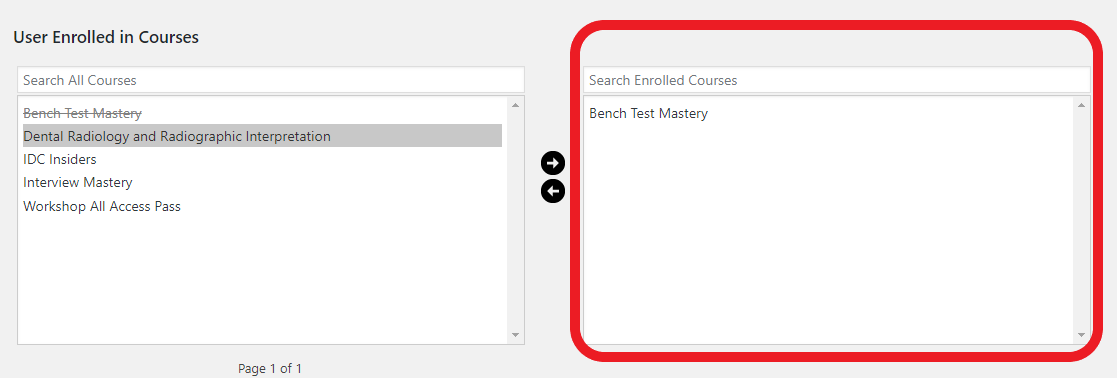
- Go to our member site and look for the new member’s profile under Users. Make sure that the courses they signed up for are listed under the box highlighted in the image below. If they’re not, simply select the appropriate course and click the right arrow button to move it to the right box.
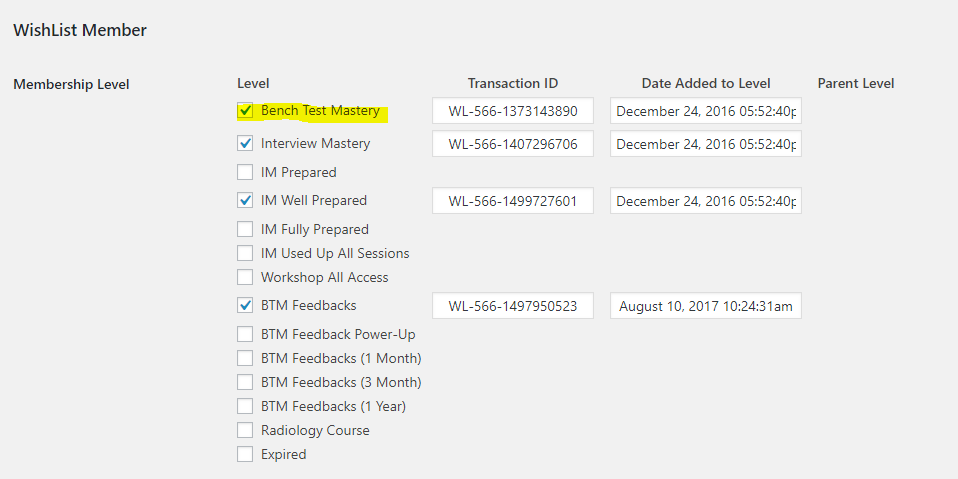
- Also, check if the courses they signed up for are checked under membership levels. If not, tick the box of the appropriate course/s they signed up for.
♦Existing Members♦
-
Checking in With Clients
Reach out to each clients especially those that are passive for quite a while or those that are not active.
Send them and email to see how things are going. Refer to this link.
-
Before Interview.
- Once you receive a news from client stating their interview information, update their Active Campaign profile and make sure the interview date and interview school fields are updated. This way, they’ll receive a Good Luck email from us through an automation.
- Constant follow-up is a must for each client that has upcoming interviews.
- Bi-weekly follow up for clients that are not practicing or inactive clients.
-
After Interview
- Send follow-up email asking the client how the interview went and if they want to talk to Dr. Alyssa about it. (Template can be found on this link. After email template #1)
- Once we get news that interview results for certain school has been released, send a follow-up email to those interviewed clients. Template on this (Any News) link.
-
Accepted Clients:
- Send Congrats! email and ask them if they would like to leave a review on our Facebook page on how our courses have helped them. Email template for this can be found under Int’l Dentist Centrals Saved Replies on Helpmonks.
The email templates you can use for this are called:
” Accepted Bench Test Mastery – Congratulations” and “Accepted Interview Mastery member”
Use the template according to which type of member the client is. - Tag as accepted in Active Campaign.
- Unsubscribe from Active Campaign list.
- Set the membership to expire after 1 month from acceptance date.
- Update IDC Client Success Report Spreadsheet
- If client was BTM member, update Reports tab of BTM Feedbacks spreadsheet
For more information on Acceptance of member procedures – follow this link.
- Rejected and Wait-listed Clients:
- Send and email encouraging them that we’re still here to help them in their next application cycle.
- Ask what were the questions asked during the interview so that we can prepare for the next cycle.
- Rejected and Wait-listed Clients:
- Send Congrats! email and ask them if they would like to leave a review on our Facebook page on how our courses have helped them. Email template for this can be found under Int’l Dentist Centrals Saved Replies on Helpmonks.
♦other tasks♦
-
Feedback Processing
Currently, all feedbacks already automated.
-
Workshop Wednesday
- Workshop Wednesday or member meetings usually takes place at 6 PM Pacific Time.
- Instruction details can be found here.
-
Processing Reviews / Testimonials
This link has the detailed instructions on how to process client reviews/testimonials.